
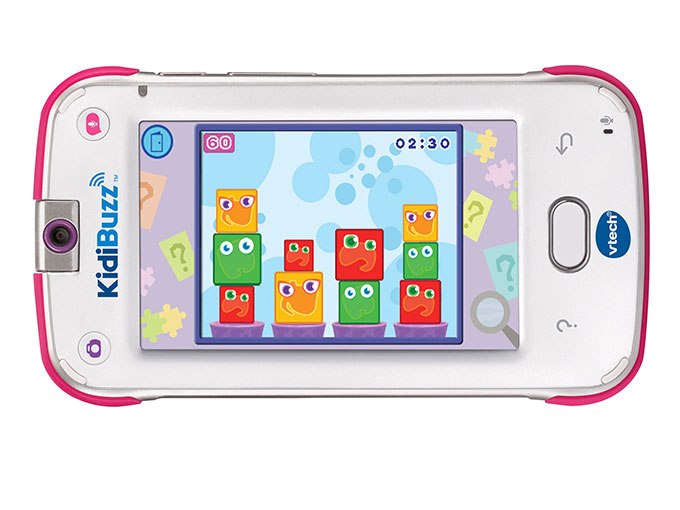
VTech KidiBuzz Review: A First Smart Device for Kids
7 min read
1309 words
When school lets out for the summer, it doesn’t take long before parents hear those familiar words: “I’m bored!” Finding ways to keep children entertained while encouraging creativity and learning can be a challenge. As a dad, I also understand why parents might hesitate before handing a young child their own smartphone.
When my daughter was younger, we tried the VTech KidiBuzz, a child-focused smart device designed to give kids some of the features they see adults using without being a conventional cell phone. It offered games, a camera, messaging features, and parental controls in a colourful, kid-friendly design.
Looking back at our experience, the KidiBuzz was an interesting introduction to technology for my daughter. Here is what we liked about it and what parents should consider when looking at a device like this today.
A First Phone Experience Without a Traditional Cell Plan
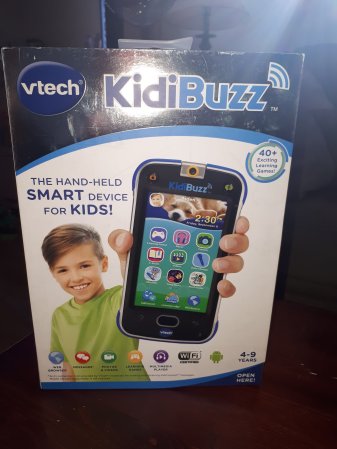
The VTech KidiBuzz looked a little like a smartphone, which was part of its appeal to my daughter. It gave her a device of her own to explore while providing features intended for children.
Unlike a typical smartphone, the model we used relied on Wi-Fi for internet-based features rather than a regular cellular plan. That meant we could use supported online functions at home or anywhere with a suitable Wi-Fi connection.
However, it is important to understand that Wi-Fi connectivity does not automatically make a device completely secure. Parents still need to review its communication features, browser settings, app permissions, and privacy options.
The KidiBuzz was designed to provide a more controlled introduction to digital technology, but I would still treat it as a device that needs parental supervision.
Keeping in Touch with KidiConnect
One of the features that made the KidiBuzz appealing to our family was KidiConnect, VTech’s communication service for supported devices. It was designed to let children exchange messages with approved contacts through the associated app.
My daughter enjoyed having a way to communicate with me using her own device. Instead of only sending text, the messaging features included options such as photos, drawings, stickers, and voice messages. There were also preset messages that helped younger children communicate before they became comfortable typing.
I particularly liked that my daughter could practise using an on-screen keyboard. Learning to type short messages gave her a chance to develop confidence with technology while practising basic reading and writing skills.
Family communication features can be useful, especially when children want to share a funny picture or tell a parent about something they have been doing. Still, parents should check whether a device’s messaging service and companion app remain available and compatible before purchasing an older model.
Educational Games and Kid-Friendly Entertainment
The KidiBuzz included a selection of games and other activities intended to entertain children while encouraging learning. Depending on the model and software version, features included educational games, digital books, and basic tools such as a calendar or calculator.
My daughter enjoyed having different activities to explore, and I liked the idea of a device that offered more than just video watching.
The original KidiBuzz also supported additional content through services associated with VTech and, on supported versions, Android apps. However, app availability, online services, and compatibility can change as software ages. I would not assume that every feature advertised when the device was released will still work today.
For parents considering a used KidiBuzz, I recommend checking the exact model number and confirming which apps and services can still be accessed. An older device may continue to offer some offline activities even if particular online features are no longer supported.
A Child-Focused Internet Experience
Internet access is one of the biggest considerations when choosing a smart device for a child. The KidiBuzz offered parental settings and a browser designed to restrict access to approved websites.
The original system allowed parents to manage which websites children could visit, helping create a more controlled browsing experience than an unrestricted browser.
That said, no child-focused browser should be treated as a guarantee that children will never encounter inappropriate content. Filtering systems can change, websites can be updated, and online services may no longer function as they once did.
My advice is to explore the parental settings yourself before allowing a child to browse. Set clear rules about what they can access, explain why those rules matter, and check in regularly about what they are doing online.
Capturing Memories with the KidiBuzz Camera
My daughter loved taking pictures and making little videos, so the camera was one of the features that appealed to her most.
The KidiBuzz model we used had a rotating camera that made it possible to photograph what was in front of her or take selfies. It also offered creative effects, filters, and frames that let children experiment with their pictures.
The camera was not intended to compete with the cameras found in premium smartphones. For a young child, though, it offered a fun way to record everyday adventures, family outings, and silly moments around the house.
The original model came with built-in storage, with additional capacity supported through a compatible microSD card. Storage specifications can differ between models, so check the exact version before relying on the figures listed in older reviews.
A camera also provides an opportunity to talk about privacy. I encouraged my daughter to ask permission before taking pictures of family members and friends. It is a simple habit that teaches children to respect other people’s privacy before sharing photos digitally.
Parental Controls and Everyday Durability
As a parent, I appreciated that the KidiBuzz included settings intended to help adults manage how children used the device.
Depending on the model and software version, parental features included options to manage screen time, control access to websites, and restrict certain apps or functions. These controls gave parents a way to tailor the experience to their child’s age and their family’s rules.
Before purchasing an older KidiBuzz, I would check that the parental controls still function as expected and that the device can be configured without relying on a discontinued online service.
The physical design was also aimed at children. The model we used had a protective exterior and a touchscreen designed for everyday use. My daughter dropped hers several times, and it continued working during our experience with it. Of course, that is a personal observation rather than a guarantee that every device will survive a fall.
Battery life will also depend on the device’s condition, settings, and age. If you are buying a used unit, remember that rechargeable batteries lose capacity over time.
Is the VTech KidiBuzz Still Worth Considering?
When my daughter was younger, the KidiBuzz gave her a device she could call her own while introducing her to messaging, photography, games, and basic digital skills. We appreciated its child-focused design and the ability to manage certain features as parents.
Today, I would approach the KidiBuzz as an older product rather than assume it offers the same experience it did when new. Software support, app availability, online services, battery condition, and compatibility are all worth checking carefully.
If you are considering one for your child, ask yourself a few questions:
- Can the device still be set up and used with its current software?
- Are the communication and parental-control services still supported?
- Does it work with your home Wi-Fi and the apps you expect to use?
- Is the battery in good condition?
- Would a newer tablet or another child-focused device better suit your needs?
For our family, the KidiBuzz was a fun way for my daughter to begin exploring technology. The most important lesson, however, applies to any child’s device: parental guidance matters just as much as the hardware.
For information about VTech’s current electronic learning products, visit VTech or explore its Facebook page. Check the manufacturer’s current support information before purchasing an older KidiBuzz model.
Originally published in 2019 | Updated October 23, 2026






My granddaughter has this device and loves it !