The Best Extra Screens for Coding and Programming
6 min read
1052 words
Do you ever feel like your brain is slowing down because you are constantly switching between browser tabs, code files, documentation, and applications? If you have ever tried programming using only a single laptop screen, you probably understand the frustration. One moment you are writing code, the next you are checking documentation, searching for solutions, reviewing error messages, or monitoring a terminal window. Constantly switching between screens can interrupt your focus and make simple tasks feel more complicated.
Adding an extra screen for laptop use can completely change the way programmers work. A second display provides more workspace, improves concentration, reduces unnecessary distractions, and makes multitasking much easier.
For developers, an additional monitor is not just a luxury. It can become an important tool for creating a smoother and more efficient workflow.
Why Programmers Benefit from Having Multiple Screens
Programming often requires managing several pieces of information at the same time. Developers regularly work with:
- Code editors
- Documentation pages
- Testing environments
- Terminal windows
- Debugging tools
- Project management systems
- Communication apps
Trying to fit everything onto one laptop display can feel like digital juggling. You may spend more time opening and closing windows than actually writing and improving your code.
With an extra screen for your laptop, you can organize your workspace more effectively. For example:
- Write code on your main laptop screen while viewing documentation on the second display.
- Monitor application performance or logs without leaving your coding environment.
- Keep communication tools open without interrupting your workflow.
- Compare files or review changes side by side.
Having additional screen space allows your mind to focus on the task instead of constantly searching for information.
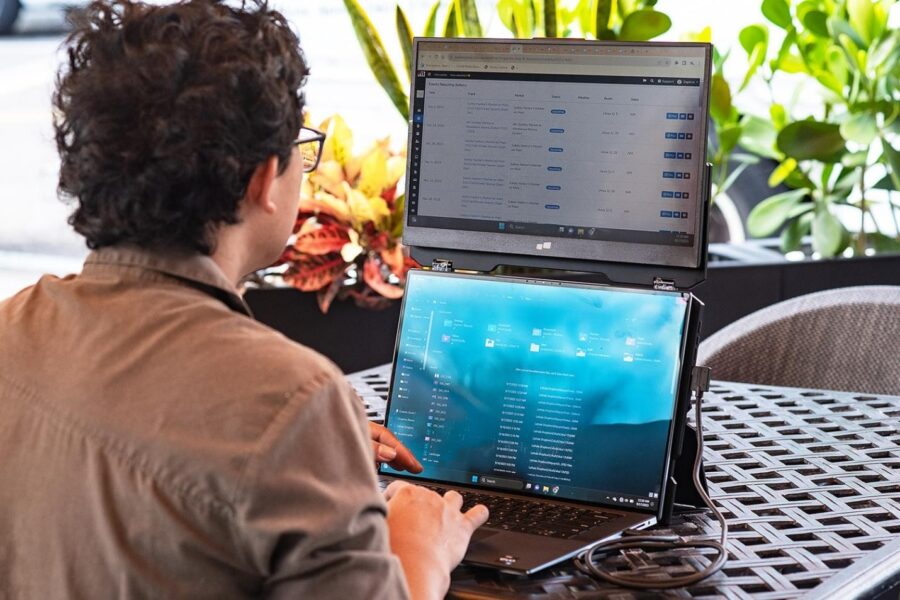
Tools such as portable laptop screen extenders and attachable displays make it easier for developers to create a dual-monitor setup without needing a large desktop workstation. Products like the Duex Float are designed to attach directly to laptops, creating a portable second-screen experience that works well for programmers who travel or work remotely.
Types of Extra Screens for Laptops
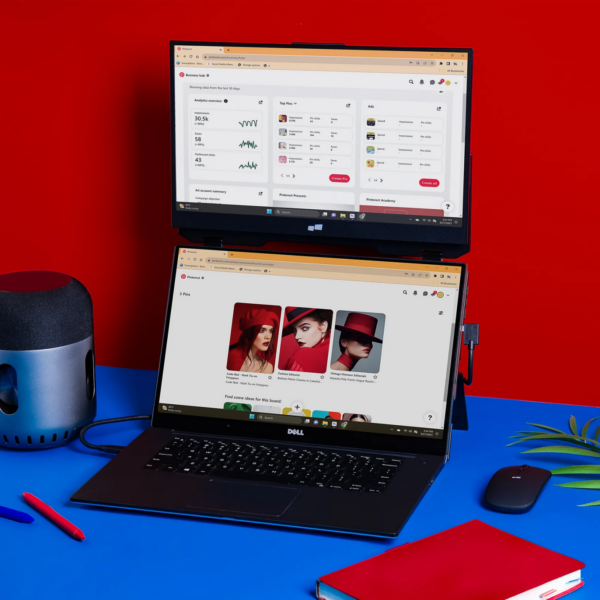
Choosing the right extra screen depends on your workspace, work style, and how much portability you need.
Portable Laptop Monitors
Portable displays are a popular choice for programmers who work from different locations. They are lightweight, easy to carry, and simple to connect.
They are ideal for:
- Remote workers
- Digital nomads
- Freelancers
- Students
- Programmers who travel frequently
A portable monitor allows you to create a productive workspace almost anywhere, whether you are working from a coffee shop, coworking space, or another room in your home.
Traditional External Monitors
For programmers who mainly work from a home office, a larger external monitor can provide even more workspace.
A larger display is useful for:
- Viewing more lines of code
- Working with complex projects
- Comparing multiple files
- Running virtual machines
- Managing larger development environments
Many developers prefer larger screens because they reduce the need to scroll and make it easier to see multiple windows at once.
Vertical or Stacked Monitor Setups
Not every programmer needs a wide horizontal setup. A vertical monitor arrangement can be extremely useful for coding because it allows you to see more lines of code at one time.
Vertical monitors are especially helpful for:
- Reading long files
- Reviewing documentation
- Viewing code without excessive scrolling
A stacked setup, where one monitor sits above another, can also be useful when desk space is limited.
Attachable Secondary Displays
For programmers who want portability without sacrificing productivity, attachable laptop screens are another option.
These displays connect directly to the laptop and provide a convenient way to expand your workspace while keeping your setup compact.
Important Features to Consider When Choosing an Extra Screen
Screen Clarity and Resolution
A clear display is important when spending hours reading and writing code.
Look for:
- Full HD resolution or higher
- Comfortable screen size
- Good brightness
- Clear text display
- Reduced glare
For portable laptop screens, sizes between 13 and 15 inches are often a good balance between usability and portability.
A sharp display can help reduce eye strain during long programming sessions.
Easy Connection Options
A good extra screen should be simple to connect and use.
Many modern portable monitors connect through:
- USB-C
- HDMI
- Thunderbolt-compatible ports
Plug-and-play connections make it easier to set up your workspace quickly without dealing with complicated installations.
Lightweight and Portable Design
If you frequently work outside the office, portability is important.
A good secondary screen should be:
- Thin
- Lightweight
- Easy to pack
- Durable enough for travel
A portable monitor that fits into a laptop bag can provide a major productivity boost without adding unnecessary weight.
Ergonomic Flexibility
Comfort matters, especially during long coding sessions.
Look for displays that allow adjustment through:
- Adjustable stands
- Tilt features
- Flexible mounting options
Positioning your screens correctly can help reduce neck strain, shoulder tension, and eye fatigue.
Your screens should ideally be positioned close to eye level, with comfortable viewing angles.
Setting Up Your Extra Laptop Screen
Adding a second screen is usually a simple process.
Most users can connect their additional display using a USB-C cable or HDMI connection. Many monitors are ready to use immediately, while some may require a quick driver installation.
For the best experience:
- Position your screens at a comfortable height.
- Keep the monitor directly in front of you when possible.
- Arrange cables neatly.
- Adjust brightness and text size.
- Keep your workspace organized.
A clean, comfortable setup can make a significant difference during long programming sessions.
More Than Just a Productivity Upgrade
An extra screen does more than provide additional space. It can help create a more organized and enjoyable work environment.
For programmers, fewer interruptions mean better concentration. Instead of constantly switching between windows, information can remain visible exactly where it is needed.
This can lead to:
- Faster problem solving
- Improved organization
- Less frustration
- Better focus
- A smoother workflow
Final Thoughts
An extra screen for laptop use can completely transform the way programmers approach their work. Whether you are a professional developer, a student learning to code, or someone working on personal projects, a second display can provide the space needed to work more efficiently.
From portable monitors for remote work to full-size external displays for home offices, there are options available for every type of programmer.
By creating a more organized workspace, an additional screen can help you spend less time managing windows and more time creating, solving problems, and building better projects.