Wireless Smart Home Technology: Gadgets That Make Life Easier
8 min read
1429 words
Imagine being able to adjust your thermostat from your phone, turn off the lights without getting out of bed, or check on your home while you’re away. These conveniences are no longer futuristic ideas. Wireless smart-home technology has made it easier for homeowners to control lighting, heating, security cameras, and everyday household devices.
As a computer technician, I’ve seen how technology can make everyday tasks simpler, but I’ve also learned that the best gadgets are the ones that work reliably and are easy to use. You don’t need to turn your entire house into a high-tech project to enjoy the benefits of a smart home. Sometimes, starting with one or two useful devices makes the most sense.
Here are several types of wireless home technology worth considering, along with a few things to keep in mind before buying.
1. Smart Home Hubs: Bringing Your Devices Together
A smart home can include connected light bulbs, thermostats, door locks, sensors, and other devices. A compatible smart home hub or platform helps these products communicate and work together.
Depending on the system, you may be able to control several devices through one app, create automatic routines, or use voice commands through a compatible smart speaker.
For example, you could create a bedtime routine that switches off selected lights and adjusts the thermostat. You might also set up a routine that turns on a lamp at a particular time of day.
Before purchasing a hub, check which wireless standards and devices it supports. Some products connect directly to your home Wi-Fi, while others use technologies such as Zigbee or Thread. Compatibility matters, particularly if you already own smart-home equipment.
You should also consider what happens if your internet connection goes down. Some functions may continue to work locally, while others depend on an internet connection or a manufacturer’s cloud service.
2. Smart Lighting: Convenient Control at Home
Smart lighting is one of the easiest ways to start building a connected home. Smart bulbs, switches, and plugs can let you control selected lights using a smartphone, voice assistant, or automated schedule.
Depending on the product, you can dim the lights, change their colour, or arrange for them to turn on and off at set times. Some systems also let you create different lighting settings for reading, relaxing, or entertaining guests.
LED lighting is generally energy-efficient compared with traditional incandescent bulbs. Smart controls may help reduce wasted electricity when lights are left on unnecessarily, although the actual savings depend on your household’s habits and the equipment you install.
Popular smart-lighting options include Philips Hue and LIFX, but there are also more affordable products available. Check whether a bulb requires a separate hub and make sure it fits your existing light fixture.
One practical tip: if several people in your household use the same lights, choose a system that is straightforward for everyone to operate. A smart bulb that becomes inconvenient when someone uses the wall switch may not be the best choice for every room.
3. Smart Thermostats: Managing Home Comfort
A smart thermostat lets you adjust your home’s temperature using a compatible phone app. Many models support schedules, remote adjustments, and features designed to help manage heating and cooling more efficiently.
Some thermostats can use occupancy information or learn from household routines, depending on the model. These features may help reduce unnecessary heating or cooling when nobody is home.
However, energy savings are not guaranteed. They depend on your home’s insulation, heating and cooling equipment, local climate, energy prices, and how you use the thermostat.
Before buying one, check that the thermostat is compatible with your existing heating and cooling system. Some installations require a common wire, often called a C-wire, or another approved power solution. If you’re unsure about the wiring, have a qualified professional assess the installation.
A smart thermostat is most useful when it makes temperature control easier while helping you manage your home’s energy use.
4. Wireless Security Cameras: Keeping an Eye on Home
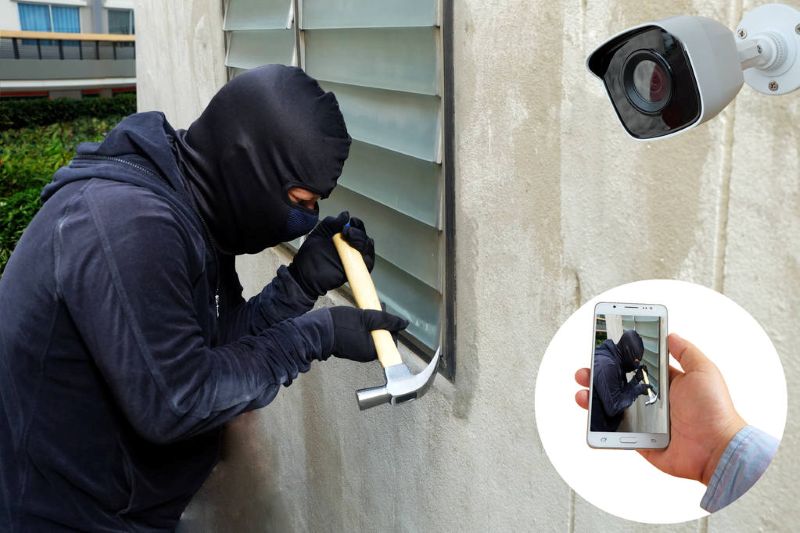
Wireless security cameras allow you to view selected areas of your property through a smartphone or computer. Depending on the model, features may include night vision, motion notifications, two-way audio, and video recording.
You could use a camera to check your front entrance, see whether a delivery has arrived, or monitor a pet while you’re away.
Before buying, consider where the camera will be installed and whether it needs to operate indoors or outdoors. Outdoor models should be rated for the conditions they will face. You’ll also want to check Wi-Fi coverage, video storage options, subscription costs, and whether recordings are stored locally or in the cloud.
Security and privacy deserve attention, too. Use a strong, unique password, enable multifactor authentication when available, and install firmware updates. Position cameras thoughtfully to respect the privacy of family members, neighbours, and visitors.
Remember that a wireless camera still needs power, whether from a wall adapter, rechargeable battery, or another supported power source. A reliable network connection is also important for remote viewing and notifications.
5. Robot Vacuums: Helping With Everyday Cleaning
Robot vacuums can take some of the routine work out of keeping floors clean. Many models can return to a charging dock automatically, follow scheduled cleaning routines, and navigate around furniture.
More advanced models may map rooms, let you select specific areas to clean, or support mopping with compatible attachments. Features vary considerably by model and price.
Before choosing one, think about your flooring, the amount of pet hair in your home, and whether the vacuum can handle rugs, thresholds, and furniture clearance. Cables, loose objects, and small items on the floor can interfere with cleaning, so a little preparation may still be necessary.
Some models offer app controls and remote scheduling, while others have simpler controls. Consider whether you need advanced mapping or whether a basic model would be enough for your home.
A robot vacuum isn’t a complete replacement for every type of cleaning, but it can help maintain floors between more thorough cleanings.
6. Smart Speakers and Voice Assistants
Smart speakers can provide another convenient way to control compatible devices. Depending on the system, you may be able to use voice commands to adjust lighting, change a thermostat setting, set timers, or play music.
They can also help bring compatible products together into routines. For example, a single command might turn off selected lights and adjust the temperature before bed.
Before setting one up, review its microphone controls, privacy settings, and the information associated with your account. If you don’t want a speaker listening for voice commands in a particular room, consider whether that room needs one at all.
Also check compatibility before purchasing smart-home devices. Products that work with one voice assistant or ecosystem may not support another.
What to Check Before Buying Wireless Home Gadgets
Smart-home technology can be useful, but buying devices without checking compatibility can lead to frustration. Before spending your money, consider these points:
- Wi-Fi coverage: Devices installed far from your router may have unreliable connections. Check your signal strength in the rooms where you plan to use them.
- Compatibility: Make sure the device works with your existing phone, smart-home platform, and other equipment.
- Ongoing costs: Some cameras and other devices charge subscription fees for cloud storage or advanced features.
- Privacy and security: Look for regular software updates, strong account security, and clear information about how your data is handled.
- Ease of use: Choose products that you and your household can operate comfortably.
- Internet outages: Find out which features continue to work if your internet connection is interrupted.
- Long-term support: Check whether the manufacturer provides updates and whether the product depends on a service that could eventually be discontinued.
You don’t need to buy everything at once. Start with a device that solves a genuine problem, learn how it works, and expand your setup only if it makes your daily routine easier.
Final Thoughts: Making Your Home a Little Smarter
Wireless home technology has developed well beyond simple remote controls. Smart lighting, connected thermostats, security cameras, robot vacuums, and voice assistants can all make certain household tasks more convenient.
My advice is to focus on practical benefits rather than buying gadgets simply because they have the latest features. Check compatibility, pay attention to security, and consider the total cost before committing to a system.
As a computer technician, I believe technology should make life easier, not more complicated. A well-chosen smart-home device can be a worthwhile addition when it solves a problem you actually have.
You don’t need a completely automated house to enjoy a smarter home. Sometimes, one useful upgrade is all it takes.