
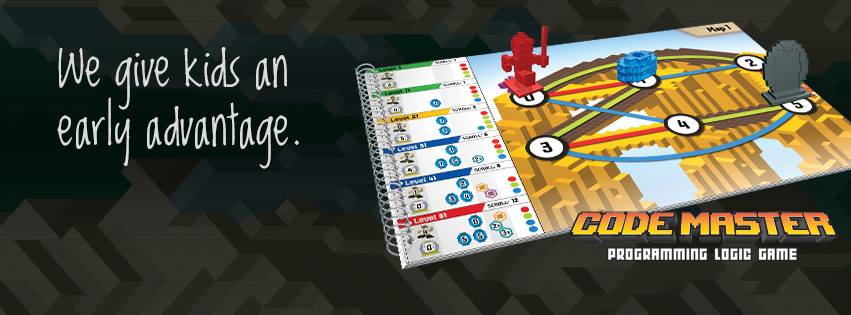
Why ThinkFun’s Code Master is a Screen-Free Gateway
6 min read
1154 words
As a professional programmer with over two decades immersed in the digital world, I know one thing for certain: while syntax changes, the fundamental logic of computation remains constant. Teaching kids to code is crucial, but what if they could build that fundamental logic before they ever touch a keyboard? Enter Code Master by ThinkFun.
Created by computer science educator Mark Engelberg, Code Master is a genius piece of educational design masquerading as a thrilling, 60-level, 1-player game for kids aged 8 and up. Its premise is simple: it teaches children how a real computer executes programs, building the kind of powerful mental model that often takes college students an entire semester to grasp.
Recently, I had the privilege of stepping away from my dual monitors to try my hand at Code Master. My wife, knowing my career path, found it rather ironic; here I was, the 20-year veteran of coding languages from C# to Python, sitting at the dining room table trying to navigate a red avatar across a colorful game board.
When challenged to test my coding skills in this physical domain, I jumped right in. What I discovered was not just a clever toy, but a meticulously designed system that validates the core principles I rely on every single day.
The Components: A Physical Programming Environment
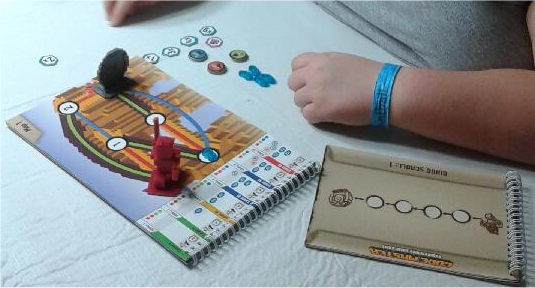
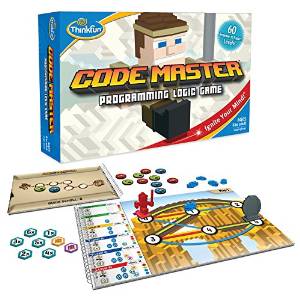
Code Master includes a beautiful array of components: a game board, a detailed map book, a Guide Scroll (the heart of the programming process), an instruction and answer book, and a handful of essential tokens and pieces.
The objective is straightforward, yet deceptively complex: guide the Red Avatar—the Code Master—through various maps to collect necessary blue power crystals and reach the elusive Portal. Simple, right? Absolutely not.
Each map is a unique puzzle designed to test sequential logic and problem-solving techniques. Crucially, you don’t move the avatar directly; you write the program that moves the avatar.
Flowcharts and Fun: Building the Program Scroll
In real-world programming, we often use flowcharts and sequence diagrams to map out complex logic before writing the first line of code. Code Master replicates this process flawlessly using the Guide Scroll.
The Guide Scroll is essentially a physical flowchart that dictates the shape and length of the required program. To solve a map, the player must strategically place action tokens (move forward, turn right, turn left, etc.) onto the scroll to form a complete, executable sequence.
This is where the magic begins.
When kids play Code Master, they aren’t just moving pieces; they are learning sequential execution. They learn that the computer (themselves, in this case) follows instructions precisely, one step at a time, and that the order of those steps is paramount. The physical act of laying out the tokens creates a tangible representation of abstract programming concepts. They are forced to think through the entire path and anticipate the avatar’s state (its position and direction) after every single command.
The levels start off incredibly easy, allowing the player to master basic movement, but they rapidly introduce complexity. By the time you reach the Intermediate or Difficult maps, you are solving genuine computational puzzles that require intense focus and foresight.
The Code Master is challenged not by a digital screen displaying errors, but by the undeniable physical reality of the board. If the program scroll tells the Red Avatar to move forward twice, and there is a wall after the first step, the program fails. This immediate, physical feedback loop is incredibly powerful for cementing logical concepts.
Beyond the Basics: Mastering Loops, Conditions, and the Art of Debugging
What truly elevates Code Master beyond a simple maze game is its ability to seamlessly integrate advanced programming techniques. As the maps become more intricate, simple sequential commands are no longer enough. The player must introduce tokens that represent fundamental coding structures: loops and conditional statements.
- Loops (Repetition): In programming, a loop allows you to execute the same set of instructions multiple times without rewriting them. Code Master forces players to identify repetitive patterns on the map and encapsulate those steps into a single, efficient loop structure on the scroll. This teaches efficiency and iterative thinking—core pillars of software development.
- Conditional Statements (If/Then Logic): This is perhaps the most crucial element. Conditional tokens allow the program to make decisions: If the avatar sees a crystal, then move forward; if the path is blocked, then turn right. This is the bedrock of dynamic programming, teaching kids that programs aren’t just straight lines of execution, but branching paths based on environmental state.
As a professional who spends the majority of my day troubleshooting, I recognize the most valuable lesson Code Master subtly imparts: Debugging.
What happens if the player compiles their program (lays out the tokens) and the Red Avatar gets stuck or misses a crystal? The player simply makes corrections along the way. We call this process “Debugging” or error reporting—the essential (and highly frustrating, frequently rewarding) task of finding and fixing mistakes in logic.
This is arguably the single most important skill the game teaches. The programmer in me chuckled when I ran into my first few failures on the map. Not that I’ve ever made a mistake while programming… cough. But the iterative process of testing the current program, identifying the point of failure, and adjusting the action tokens is a perfect, low-stakes simulation of the real debugging process. It teaches resilience and methodical problem-solving.
Why Code Master Works: The Persuasive Power of Physical Play
While Code Master won’t output JavaScript or Python code, it provides the robust logical foundation necessary for future coding success. It is a tool for cultivating computational thinking—the ability to decompose problems, recognize patterns, abstract complexity, and develop algorithms.
As a father, I also deeply appreciate that this is a coding activity that doesn’t need to be done on an actual computer. In an age where screen time is a constant battle, Code Master offers a powerful, hands-on, tangible educational experience. It engages spatial reasoning, logic systems, and concentration without placing a child in front of yet another glowing rectangle.
ThinkFun, now celebrating its 30th year, has solidified its reputation as the world’s leader in creating addictively fun games that ignite 21st-century thinking skills. Their focus is on stimulating crucial brain development in logic, visual/spatial math, and reasoning, preparing kids for a world where engineering, coding, and creativity are increasingly interconnected.
Code Master is more than just a game; it’s an investment in your child’s future analytical capabilities. It’s challenging enough to entertain an adult programmer, yet accessible enough to start building foundational logic in a child aged 8.
For a MSRP of just $19.99, Code Master is now available exclusively at Target and via Amazon.com. If you are looking for the perfect bridge between fun and crucial educational skills, look no further. Give them the building blocks of logic now, and watch them code the future later.



I am pretty sure my grandson and his family would really enjoy this game. It sounds intriguing!