Smartphone Apps for Women: Useful Tools
7 min read
1230 words
Smartphones have become an important part of everyday life. From staying in touch with family and managing appointments to tracking fitness goals and keeping finances organized, there seems to be an app for almost everything. As a computer technician, I spend a lot of time working with technology, and I appreciate how the right apps can make everyday tasks easier. While many apps are designed for everyone, others offer features that may be particularly useful to women, whether they are managing their health, building a career, organizing a busy household or working toward personal goals.
I’ve put together this guide to some categories of smartphone apps worth exploring, along with examples of apps that have been popular in these areas. App features, availability and pricing can change, so check the latest information before downloading or subscribing.
Health and Wellness Apps for Women
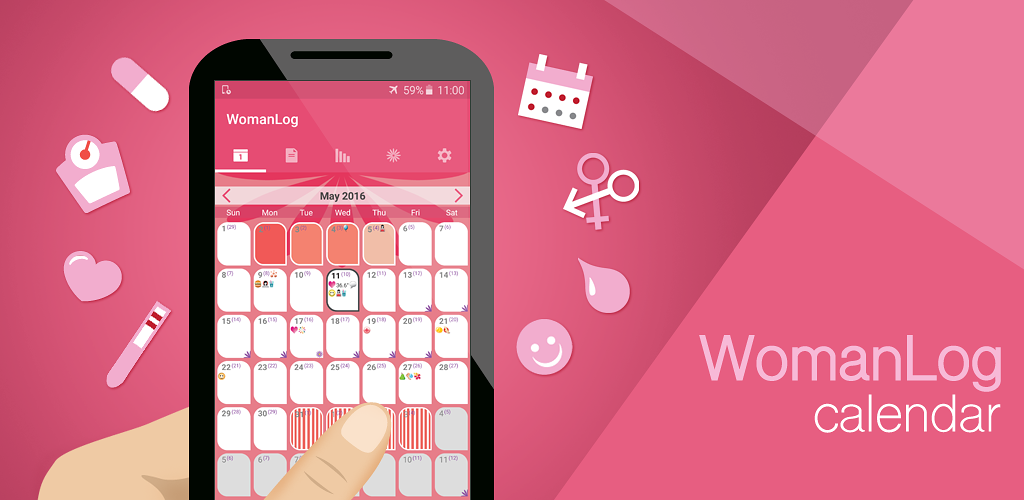
One of the advantages of smartphone technology is having tools available to help organize personal information. For women, health and wellness apps can provide convenient ways to track menstrual cycles, plan workouts and build relaxation routines.
Period-Tracking Apps
Menstrual cycle tracking apps can help women record their periods, monitor symptoms and keep track of changes from month to month. Popular examples have included Flo, Clue and Period Diary.
Depending on the app, features may include:
- Recording period dates and cycle lengths
- Tracking symptoms, moods and energy levels
- Keeping notes about sleep and other changes
- Estimating future periods
- Organizing information to discuss with a healthcare professional
From a technology standpoint, these apps offer a convenient way to keep personal records in one place. The information may help users identify patterns and prepare for medical appointments.
However, predictions are estimates, not guarantees, and these apps should not replace medical advice. Because menstrual information is sensitive, I also recommend reviewing an app’s privacy policy and checking how personal data is stored, shared and deleted.
Fitness Apps for Women
Fitness apps offer another way to make use of smartphone technology. Whether someone prefers exercising at home, going to the gym, walking or following a yoga routine, there are apps to suit different interests and experience levels.
Nike Training Club and FitOn are examples of fitness platforms that have offered guided workouts and exercise programs. Their current features and subscription options should be checked before signing up.
When comparing fitness apps, look for programs that match your abilities and schedule. Beginner-friendly instructions, exercise modifications and flexible workout lengths can make it easier to establish a routine.
The goal doesn’t have to be achieving a particular appearance or meeting someone else’s expectations. A good fitness app should help users work toward goals that matter to them, whether that means improving strength, building stamina or simply making more time for movement.
Meditation and Mental Wellness Apps
Taking time to relax can be difficult when work, family and other responsibilities compete for attention. Meditation and mindfulness apps offer guided breathing exercises, relaxation sessions and sleep-related content.
Headspace and Calm are two well-known examples in this category. Depending on the service and subscription, users may find guided meditation, mindfulness exercises and bedtime content.
Some people prefer a short session in the morning, while others use relaxation exercises before going to sleep. The best approach is to find something that fits comfortably into your day.
These apps can support general wellness, but they are not substitutes for professional mental health care when it is needed.
Career and Networking Apps
Smartphones have also changed how people build professional relationships and explore career opportunities.
LinkedIn is a useful example of a networking platform that allows users to maintain a professional profile, connect with colleagues, follow companies and search for jobs. Women interested in entrepreneurship or career development may also find professional groups and industry communities helpful.
Online communities can offer opportunities to exchange ideas, ask questions and learn from people with similar interests. There are groups for business owners, writers, creative professionals, parents and many other communities.
My advice is to look for groups that offer constructive discussions and useful information. Protect your personal details, check the credibility of advice and remember that not every online community will be a good fit.
Financial Apps for Budgeting and Investing
Keeping track of household expenses, savings and financial goals can be easier with the help of a well-designed app.
Budgeting apps may allow users to categorize spending, monitor bills, set savings targets and review their financial habits. Some financial platforms also provide tools for following investments and learning about the markets.
Mint and Personal Capital were names associated with personal finance tools in earlier versions of this article, but their services have changed over time. Before choosing an app, confirm its current status and investigate reputable alternatives.
For Canadian users, it is especially important to check whether an app supports Canadian financial institutions and accounts.
Before connecting a bank account or sharing financial information, investigate the company’s security practices, fees and privacy policy. Investment apps should also be evaluated carefully: understand the risks, charges and available products before committing money.
An app can help organize financial information, but it cannot guarantee investment returns or replace professional financial advice.
Everyday Organization Apps
Not every useful app needs to focus on health or finances. Sometimes the biggest benefit comes from keeping everyday responsibilities organized.
Depending on your needs, consider apps for:
- Calendars and reminders: Keep appointments, birthdays and important dates organized.
- Shopping lists: Make grocery shopping and household errands easier to manage.
- Notes and documents: Save ideas, lists, recipes and important information.
- Travel planning: Organize reservations, directions and travel details.
- Photo storage: Back up important pictures and keep memories accessible.
Many smartphones already include basic tools for these tasks, so you may not need to pay for another app. I always recommend trying the built-in options first before downloading something new.
A Few Things to Consider Before Downloading
As someone who works with technology, I believe convenience should never come at the expense of security or privacy.
Before installing an app, take a few minutes to check the developer, read recent reviews and understand what information the app collects.
Here are some practical tips:
- Review the permissions requested by the app.
- Use strong, unique passwords for important accounts.
- Enable two-factor authentication when available.
- Check subscription costs and automatic renewal terms.
- Keep your phone’s operating system and apps updated.
- Be cautious about sharing personal, health or financial information.
- Remove apps you no longer use and review their access to your data.
Remember that an app’s presence in an official app store does not automatically mean every feature is suitable for you. Read the details and decide whether the benefits justify the information you need to share.
Final Thoughts from Shawn
There are thousands of smartphone apps available, and the right choices will depend on each person’s interests, responsibilities and goals. Some women may find cycle tracking or fitness tools helpful, while others may get more value from budgeting, networking or organization apps.
My recommendation is to start with a specific need and find an app that addresses it well. You don’t need to fill your phone with dozens of downloads to benefit from technology.
When chosen carefully, smartphone apps can help women stay organized, access useful information, build connections and manage everyday tasks. Take the time to compare your options, protect your personal information and choose the tools that genuinely make your life easier.