
8 min read
1517 words
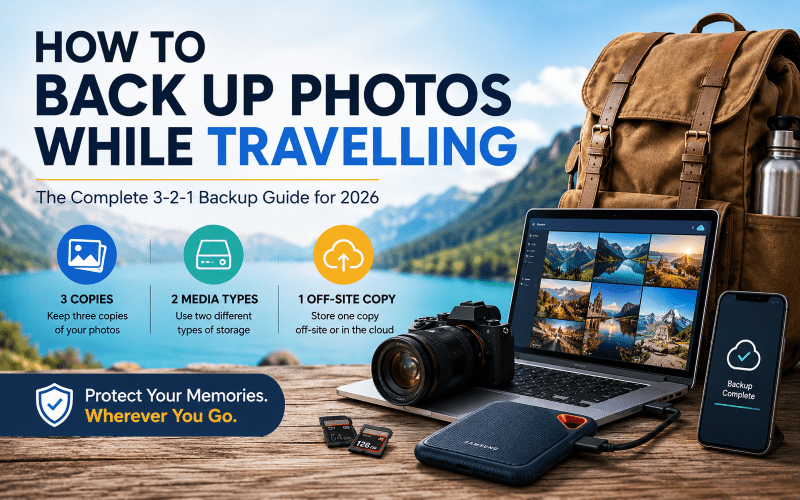
There is nothing quite like returning home from an incredible trip and reliving your adventures through the photos you captured. Whether it’s a family vacation, a bucket-list destination, or a once-in-a-lifetime travel experience, those images become some of your most treasured memories. Unfortunately, many travelers discover too late that their photos aren’t as safe as they thought. Memory cards fail, phones get stolen, laptops crash, and hard drives stop working without warning. Knowing how to back up photos while travelling can mean the difference between preserving your memories forever and losing them permanently. The good news is that protecting your travel photos is easier than ever. By following the proven 3-2-1 backup rule and using a combination of cloud storage and portable backup devices, you can travel with confidence knowing your images are secure. In this guide, you’ll learn the best travel photo backup strategies, recommended devices, and step-by-step workflows for keeping your vacation photos safe in 2026 and beyond.
Why Backing Up Travel Photos Is Essential
Many travelers assume their photos are safe until disaster strikes. Unfortunately, digital files are far more fragile than most people realize.
Devices Can Fail Without Warning
Technology is reliable until it isn’t.
Common causes of photo loss include:
- Corrupted SD cards
- Accidental formatting
- Water damage
- Dropped smartphones
- Camera malfunctions
- Laptop hard drive failure
- Software errors
Even premium devices can fail unexpectedly.
Theft and Loss Are Common Travel Risks
Travel presents unique challenges for protecting electronics.
Airports
Bags occasionally go missing during transfers, and electronics are frequent targets for theft.
Public Transportation
Pickpocketing remains one of the most common travel crimes in major cities worldwide.
Hotels
While most accommodations are safe, misplaced items, theft, and accidental damage can still occur.
Once Your Memories Are Gone, They’re Gone
A camera can be replaced. A smartphone can be upgraded.
The sunset over Santorini, your child’s first trip to Disney, or a surprise marriage proposal captured on camera cannot be recreated.
That is why a proper travel photo backup strategy is essential.
The 3-2-1 Backup Rule Explained
Professional photographers and IT experts rely on the 3-2-1 backup rule because it significantly reduces the risk of data loss.
Keep 3 Copies of Your Photos
You should always maintain:
- The original files on your camera or phone
- A local backup on another device
- A third backup stored elsewhere
Store Them on 2 Different Types of Media
Avoid keeping all copies on similar devices.
Good examples include:
- Camera + Portable SSD
- Laptop + Cloud Storage
- Smartphone + External Drive
Using multiple storage types protects against manufacturing defects and hardware failures.
Keep 1 Copy Off-Site
An off-site copy means your files exist somewhere physically separate from your travel gear.
Examples include:
- Google Photos
- iCloud
- Dropbox
- Microsoft OneDrive
If your luggage is stolen, your cloud backup remains untouched.
How Much Storage Do You Need for Travel Photos?
One of the biggest mistakes travelers make is underestimating their storage requirements.
Typical Storage Needs
| Traveler Type | Estimated Storage for 2 Weeks |
|---|---|
| Smartphone Photographer | 20GB–100GB |
| Family Traveler | 50GB–200GB |
| DSLR Photographer (JPEG) | 100GB–300GB |
| DSLR Photographer (RAW) | 250GB–1TB |
| Drone User (4K Video) | 500GB–2TB+ |
| Content Creator | 1TB–4TB+ |
For most travelers, a 1TB portable SSD offers an excellent balance between capacity and cost.
Best Ways to Back Up Photos While Travelling
1. Use Cloud Storage
Cloud storage remains the easiest way to create an off-site backup.
Popular Cloud Storage Services
| Service | Free Storage | Best For |
|---|---|---|
| Google Photos | 15GB | Android users |
| iCloud Photos | 5GB | Apple users |
| OneDrive | 5GB | Windows users |
| Dropbox | 2GB | Cross-platform users |
Advantages
- Automatic syncing
- Accessible from anywhere
- Protection against theft and loss
- Easy sharing with friends and family
Disadvantages
- Requires internet access
- Uploads can be slow on hotel Wi-Fi
- Subscription fees for larger storage plans
2. Carry a Portable SSD
A portable SSD is one of the best travel photography storage solutions available today.
Why SSDs Are Better Than Traditional Hard Drives
- Faster file transfers
- More resistant to drops
- Smaller and lighter
- No moving parts
- Better durability during travel
3. Use a Laptop as a Secondary Backup
If you already travel with a laptop, use it as an additional backup location.
A simple workflow is:
- Transfer photos to laptop
- Copy photos to SSD
- Upload important files to cloud storage
This creates multiple layers of protection.
4. Use Wireless Backup Devices
Travelers who prefer to leave their laptops at home can use wireless storage devices.
These devices allow direct transfers from:
- Cameras
- Smartphones
- SD cards
- Tablets
without requiring a computer.
How to Back Up Photos from Different Devices
iPhone Users
Enable iCloud Photos
- Open Settings
- Tap your name
- Select iCloud
- Tap Photos
- Enable iCloud Photos
Use a Portable Drive
Lightning and USB-C flash drives allow direct backups without needing a computer.
Android Users
Enable Google Photos Backup
- Open Google Photos
- Tap Settings
- Select Backup
- Turn Backup On
Connect an External SSD
Most modern Android devices support USB-C drives and portable SSDs.
DSLR and Mirrorless Cameras
Use Dual Memory Cards
If your camera supports dual card slots, record photos to both cards simultaneously.
This provides instant redundancy.
Daily Backup Routine
Transfer files every evening and avoid formatting cards until multiple backups exist.
Drone Photography
Drone footage consumes storage quickly.
After every flight:
- Download footage
- Copy to SSD
- Upload important clips to cloud storage whenever possible
Best Portable SSDs for Travel Photo Backup in 2026
When choosing a travel SSD, focus on durability, speed, and capacity.
Features to Look For
- Shock resistance
- Water resistance
- Dust protection
- USB-C connectivity
- Transfer speeds above 500MB/s
- At least 1TB capacity
Recommended Portable SSDs
| SSD | Capacity Options | Water Resistance | Best For |
|---|---|---|---|
| Samsung T7 Shield | 1TB–4TB | Yes | Most travelers |
| SanDisk Extreme Portable SSD | 1TB–4TB | Yes | Adventure travel |
| Crucial X9 Pro | 1TB–4TB | Limited | Budget-conscious travelers |
| LaCie Rugged SSD Pro | 1TB–4TB | Yes | Professional photographers |
Best Backup Strategy for Different Types of Travelers
Casual Vacationers
- Smartphone
- Google Photos or iCloud
- Portable flash drive
Family Travelers
- Smartphone and camera
- Portable SSD
- Cloud storage
Travel Bloggers and Content Creators
- Laptop
- SSD
- Cloud backup
- Multiple memory cards
Professional Photographers
- Dual memory cards
- Laptop
- Multiple SSDs
- Cloud storage
- Daily verification checks
Digital Nomads
- Laptop
- SSD
- Cloud storage
- Automated backup software
My Recommended Travel Photo Backup Workflow
Consistency matters more than expensive equipment.
Daily Routine
Step 1: Upload
Transfer photos from your phone or camera to your laptop or tablet.
Step 2: Create a Physical Backup
Copy all files to your portable SSD.
Step 3: Sync to the Cloud
Upload your most important photos whenever reliable Wi-Fi is available.
Step 4: Verify
Open a handful of files from each backup location to ensure everything copied correctly.
Step 5: Store Devices Separately
Never keep your camera and SSD in the same bag.
If one bag is lost or stolen, you still have a backup.
Common Travel Photo Backup Mistakes
Keeping Everything on One Device
Never rely on a single phone, camera, or laptop.
Relying Only on Cloud Storage
Internet access isn’t always available when travelling.
Formatting Memory Cards Too Soon
Wait until you have at least two verified backups.
Never Testing Your Backups
Always open a few files to confirm they work properly.
What to Do If You Lose Your Camera While Travelling
If your camera is stolen or lost:
Check Your Cloud Backup
Log into your cloud service immediately.
Recover from Your SSD
If your SSD is stored separately, your photos remain safe.
Contact Your Travel Insurance Provider
File a police report and begin the claims process as soon as possible.
Frequently Asked Questions
How often should I back up travel photos?
Ideally every day. Waiting until your memory card is full increases your risk.
Is cloud storage enough for travel photos?
No. Cloud storage should be combined with a physical backup device.
Can I back up photos without a laptop?
Yes. Portable SSDs, wireless drives, and smartphone-compatible flash drives make laptop-free backups easy.
What’s better for travel: SSD or HDD?
SSDs are faster, lighter, more durable, and better suited to travel.
How many photos fit on a 1TB SSD?
Approximately:
- 250,000 smartphone photos
- 25,000–40,000 RAW photos
- 150–250 hours of HD video
Should I carry multiple SD cards?
Yes. Multiple smaller cards reduce risk compared to storing everything on one large card.
Can airport scanners damage SSDs or memory cards?
No. Modern SSDs, SD cards, and USB drives are not affected by airport X-ray scanners.
Recommended Travel Photo Backup Kit
For a typical two-week trip, consider:
Primary Device
- Smartphone or camera
Physical Backup
- 1TB Samsung T7 Shield SSD
Optional Secondary Backup
- USB-C flash drive
Connectivity
- USB-C cables
- Card reader
- Lightning adapter (if required)
Cloud Storage
- Google Photos
- iCloud+
- OneDrive
- Dropbox
Final Thoughts
Learning how to back up photos while travelling is one of the smartest travel habits you can develop. Following the 3-2-1 backup rule ensures that even if a device fails, a memory card becomes corrupted, or your luggage is stolen, your photos remain protected.
By combining cloud storage, a portable SSD, and a simple daily backup routine, you’ll have peace of mind knowing your travel memories are safe.
Before your next trip, set up your backup system, test it, and make backups part of your daily travel routine. Your future self will thank you.
 Nancy Whitmore
  Rose DesRochers