

4 min read
604 words
In today’s digital world, online payment platforms like PayPal make transactions quick and convenient. Unfortunately, scammers also take advantage of this by sending fraudulent emails designed to steal your personal and financial information. Learning how to spot a fake PayPal email is crucial to protecting your money and privacy. This guide will teach you how to identify a PayPal scam email, what red flags to look for, and steps to stay safe when dealing with suspicious messages.
Why Do Scammers Target PayPal Users?
PayPal is one of the most popular online payment services, with millions of users worldwide. Cybercriminals often impersonate PayPal in phishing scams—fake emails or messages that trick you into revealing sensitive details like:
- PayPal login credentials
- Credit card numbers
- Social Security numbers
- Bank account information
By mimicking legitimate PayPal communications, scammers try to create urgency or fear (e.g., account suspension, unauthorized transactions) to pressure you into acting quickly without verifying the email’s authenticity.
How to Spot a PayPal Scam Email
Here are the most common signs of a fraudulent PayPal email:
1. Suspicious Sender Email Address
PayPal’s official emails always come from @paypal.com, but scammers often use addresses that look similar—such as:
Before clicking any links, check the sender’s domain carefully.
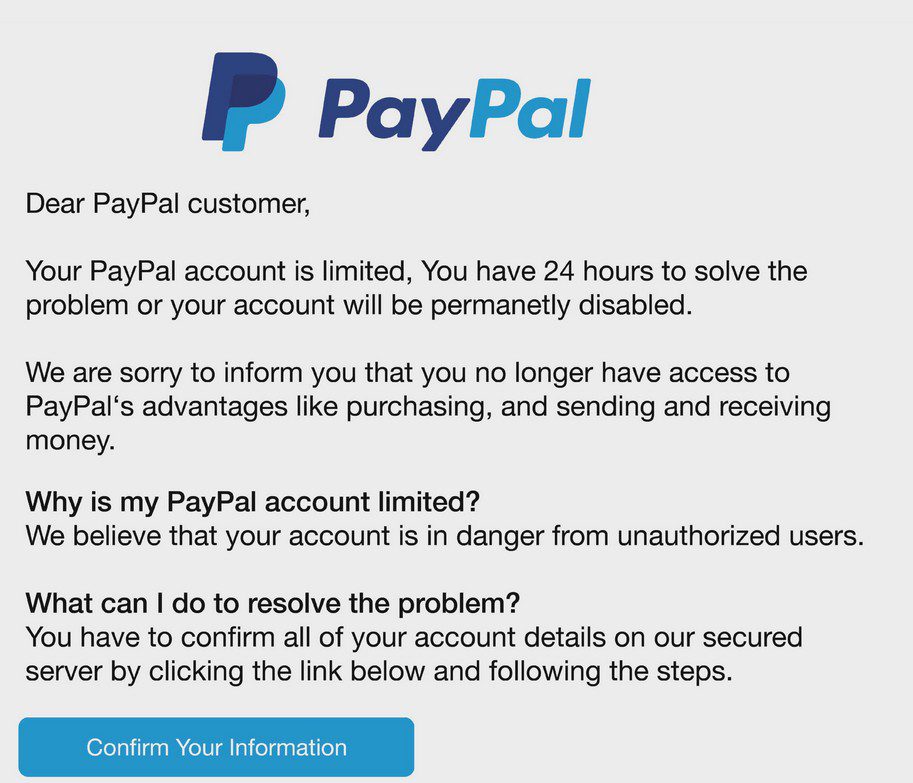
2. Urgent or Threatening Language
Scammers use fear tactics to rush you into acting impulsively. Watch for phrases like:
- “Your account will be suspended!”
- “Unauthorized login detected!”
- “Immediate action required!”
Legitimate PayPal alerts are professional and provide clear instructions without pressuring you.
3. Poor Grammar and Spelling Errors
Fraudulent emails often contain typos, awkward phrasing, or inconsistent branding. PayPal’s official communications are professionally written.
4. Fake Hyperlinks (Hover Before Clicking!)
Never click on links in suspicious emails without verifying them first. Hover your mouse over any hyperlink to see the actual URL—scammers often disguise malicious links behind legitimate-looking text.
5. Requests for Personal or Financial Information
PayPal will never ask for sensitive details like passwords, credit card numbers, or Social Security numbers via email. If a message asks for this, it’s a scam.
6. Unfamiliar Attachments or Buttons
Scammers may include harmful attachments (e.g., PDFs, ZIP files) or fake buttons that lead to phishing websites. Avoid downloading anything from unexpected emails.
What to Do If You Receive a Suspicious PayPal Email
If you suspect an email is fake:
- Do Not Click Any Links or Download Attachments – This could install malware or redirect you to a phishing site.
- Check PayPal Directly – Log in to your official PayPal account (not via the email link) to review notifications.
- Forward the Email to PayPal – Forward suspicious emails to spoof@paypal.com for investigation.
- Report the Scam – File a report with the Federal Trade Commission (FTC) or your country’s cybercrime unit.
- Enable Two-Factor Authentication (2FA) – Adds an extra layer of security to your PayPal account.
Tips to Stay Safe from PayPal Scams
- Use Strong, Unique Passwords – Avoid reusing passwords across multiple accounts.
- Enable PayPal Security Key – Requires a one-time code for login verification.
- Check for PayPal’s Official Logo & Branding – Scammers often use outdated or incorrect logos.
- Bookmark the Real PayPal Site – Avoid searching for PayPal via Google; go directly to paypal.com.
- Educate Yourself on Common Scams – Stay informed about new phishing tactics.
Final Thoughts
Scammers are always evolving, but by staying vigilant and knowing the warning signs, you can protect yourself from PayPal email fraud. Always verify suspicious messages directly through your PayPal account rather than clicking email links.
If you found this guide helpful, share it with friends and family—awareness is the best defense against scams!
 Rose DesRochers